GivEnergy

OPEN BETA

GivInstaller app

Commission GivEnergy systems with a few quick clicks

Onboard your GivEnergy
customers with ease

The last thing you want as a GivEnergy installer is to face delays in the field.

You want to install then commission the system with minimal time and effort.

Enter GivInstaller.

An app custom-built for quick commissions

Our new GivInstaller app revolutionises the commissioning process for installers. You get a super-simple experience coupled with super-fast commissioning speeds. Let’s take a closer look.

Get in front of every install

Invite customers to onboard ahead of their installation date. With the tap of a screen, GivInstaller will email your customer in advance to:

  • Confirm their Wi-Fi credentials
  • Confirm their installation date
  • Secure their agreement to the End-User License Agreement (EULA)
  • Provide access to the customer portal and web app

So, no delay on the installation day. Your customer is prepped, and you’re in front before you’ve even begun.

Connect and secure the system seamlessly

Get the system and its various components connected within seconds. With GivInstaller setup and connectivity is a breeze.

  • GivInstaller uses the customer’s pre-gathered Wi-Fi credentials to connect and secure the system seamlessly
  • The dongle and the inverter link automatically
  • GivInstaller handles all assigning, registering, and connecting so you don’t have to
  • In-app verification of signal strength provides a quick appraisal of whether the connection is strong enough to proceed

Simply view and verify

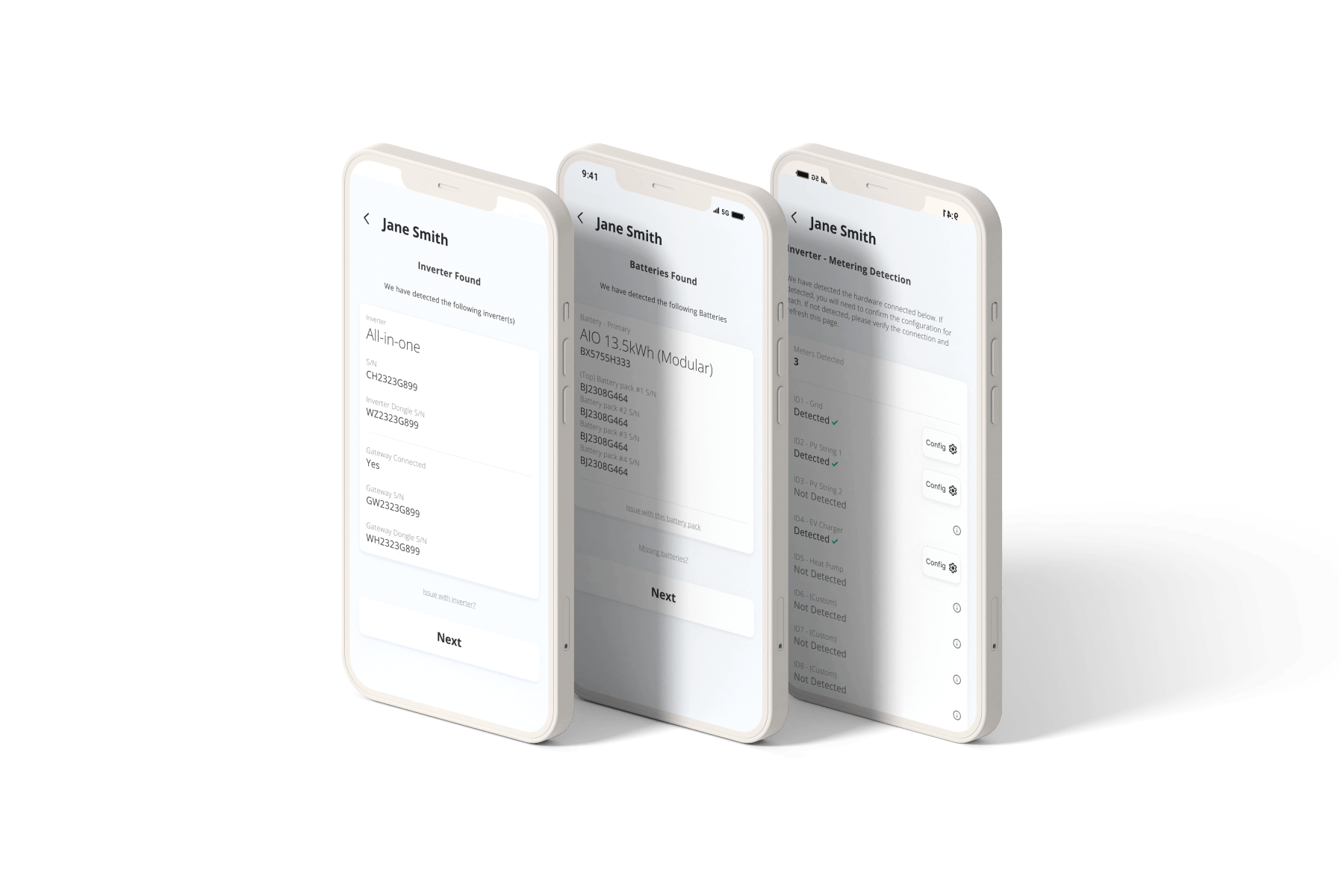
Don’t waste time on manual data entry. With GivInstaller, all relevant fields are auto-filled for you during commissioning. All you have to do is view and verify.

  • System information is auto-filled via the dongle connection
  • The app rapidly detects the hardware installed and you confirm
  • Inbuilt metering detection allows you to troubleshoot the installation with ease
  • Setup is as smart, as fast, and as effortless as possible
A rich inbox
provides fast, open communication.
A commissioning workflow
makes task management easy and efficient.
Connection validation
makes firmware updates reliable over-the-air.

Built for you, with you

We’re committed to making life for our GivEnergy installers as easy, as smooth, and as rewarding as possible. We’ve built this beta app based on your feedback, and we’ll continue to refine it alongside you.

Speed up your installation workflow by downloading the GivInstaller app now.

FAQ

What is GivInstaller?

GivInstaller is our new engineer-facing app that speeds, simplifies, and streamlines the commissioning process. It’s built for our GivEnergy installers to help them complete GivEnergy jobs quicker and easier than ever before. The app is currently in beta – so watch this space for further updates. 

How many installers can participate in the GivInstaller beta?

The GivInstaller beta is available now for all our installers to try out. Get it on the App Store or on Google Play today.

Which GivEnergy systems is GivInstaller compatible with?

Currently, GivInstaller is compatible with: 

  • All generation hybrid inverters 
  • AC coupled systems 
  • All in One + Giv-Gateway configurations 
  • All in One standalone systems 
  • Three-phase inverters 

However, due to current firmware limitations, only Gen 3 hybrid and All in One standalone systems support ID meter detection. We are continuously working to expand compatibility and will soon introduce support for multi-inverter systems. 

Can I still use the old commissioning process if I’ve signed up to GivInstaller?

We encourage you to trust the new process and use only the GivInstaller app for commissioning during testing. Using the old process or dongle interface will result in a commission failure. 
How it works

1. Discover

We’ll ask about your home and its power use

2. Locate

We’ll help you find a nearby installer to fit your products

3. Contact

We’ll send your query off to local installers for quotes

4. Install

You’ll get your product fitted by your chosen installer

5. Control

Done - you’ll be in full control of your energy

Button Link